

#1. The ACTIVE CELL is the name given to the cell that is CURRENTLY SELECTED.
#2. The SHORTCUT KEYS CTRL+V can be used to VALIDATE a CELL FORMULA:
#3. Without using the RIBBON, how do you RENAME a worksheet tab? Select the most correct answer.
#4. Multiple WORKSHEETS make up a WORKBOOK.
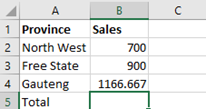
#5. Which MICROSOFT EXCEL FORMULAS can be used to ADD values?
#6. When pressing the combination of Ctrl + Z, MICROSOFT EXCEL will?
#7. To ADD ALL NUMBERS in a RANGE of cells in MICROSOFT EXCEL, you can use the following formula:
#8. On which RIBBON do you find the FREEZE PANE command?
#9. A ROW in MICROSOFT EXCEL:
#10. The SHORTCUT key F12:
#11. Which is the MOST ACCURATE STATEMENT about moving around between cells in MICROSOFT EXCEL?
#12. MICROSOFT EXCEL allows users to group worksheets together so that a user can edit two or more worksheets at the same time.
#13. The following SHORTCUT KEYS take you to the PRINT DIALOGUE WINDOW:
#14. A USER can INSERT multiples COLUMNS at the same time.
#15. Which of the following statement(s) are NOT correct?
#16. The following SHORTCUT KEYS are used to open the REPLACE dialog box:
#17. Which of the following SHORTCUT KEYS will UNDO the last mistake made?
#18. What does the FORMULA bar do?
#19. What is the purpose of the FORMAT PAINTER?
#20. A CELL ADRESS is where the COLUMN and ROW intercept.
Results
Good day,
Thank you for completing our NextGen Online Computer Assessment. You have successfully passed the assessment.
Would you like to challenge yourself further by completing the assessment for the next level of Microsoft Excel?
If you would, you can follow this LINK/URL:
For other free NextGen Online Computer Assessments, please go to:
Regards
NextGen Training Solutions

Good day,
Thank you for completing the NextGen Online Computer Assessment. You have unfortunately not reached the pass mark of 70% for this level.
This should not be seen as a negative, but rather as a reminder of some of the functionality which Microsoft Excel offers. Learning more about Microsoft Excel can help you in your day to day environment.
We see this as a positive message, as this indicates that you may potentially benefit from attending the following training to remind you of, or make you aware of what you can do with Microsoft Excel:
- Microsoft Excel (Level 1)
Regards
NextGen Training Solutions


